How to build your own LLM brand tracker for a fraction of what the tools charge
Last night I finished building something I had been turning over in my head for a while. A full LLM brand tracking system, built from scratch, running on affordable infrastructure, and producing the outputs you would expect from a dedicated tracking tool.
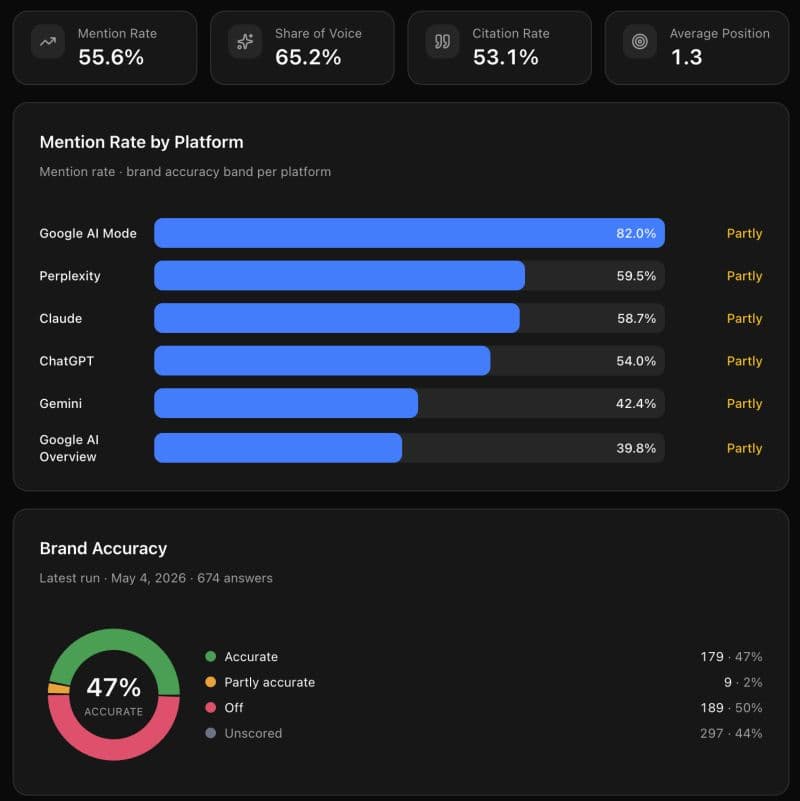
Here is how it works and how to build it yourself.
The only method that exists
Tracking whether your brand appears in AI responses can only be done one way: you run prompts, you collect every response, and you analyse what came back. This is the method the tracking platforms are built on - running prompts, capturing responses, and analysing at scale.
I first worked this out manually when I was at CXL. The process was simple. Take a prompt - something like "b2b marketing training" - send it to every model. Gemini, Perplexity, ChatGPT, Claude, Grok. Save the response. Run the next prompt. Save that. Keep going until you have a full set, then run analysis on the collected responses through another LLM.
It worked well. You could see how often your brand appeared. You could rerun the same prompt to test consistency - does the brand show up again, or was it a one-off? There is a surprising amount of signal inside that simple loop.
That manual process is the entire underlying logic of every LLM tracking tool on the market. What the platforms have done is automate it, store it in a database, and wrap a dashboard around it. The mechanism is identical.
What the tools are doing under the hood
Every LLM analytics platform runs the same architecture. They take a set of prompts - anywhere from 100 to 10,000. They store them. Then they send each prompt through a multi-model API to every major model: Claude, Grok, Gemini, DeepSeek, ChatGPT, Google AI snippet, Google AI mode (those last two come via the Google Cloud API).
For each prompt, they pull back six to seven responses - one per model. They save every response into a database. They run deterministic analysis across those saved responses. Then they present findings in a reporting dashboard: brand mention rate, citation rate, share of voice relative to competitors, average position.
That is the full product. Prompt runner, multi-model API, database, deterministic analysis, UI. You can build this yourself. I did. I ran the exact same prompt set we use in our paid tool and got the exact same results.
What it costs
500 prompts per run costs roughly $100-$150. Scale to 1,000 prompts and you are looking at $300 to $400 per run. The cost is high because of what is happening at the token level - every prompt goes to six or seven models, and every response from every model has to be analysed word by word and stored. That token volume adds up fast.
Running this yourself at 1000 prompts per cycle, fully automated, costs $100 to $150 per run. My current setup runs on the twenty-eighth of every month at 3am. The data is there when I open the app.
How often to run it
Monthly is enough. Day-to-day changes in LLM responses are minimal. Models lag behind normal publishing by a few days at minimum - Google takes 48 to 72 hours to index a page, and LLMs trail that. Monthly runs give you everything you need to track directional movement and measure progress over time.
Monthly cadence covers reporting needs. Between runs, you work off standard SEO metrics. Google Search Console is still your best friend, and strong organic search rankings are a reliable indicator of LLM citation.
The build, step by step
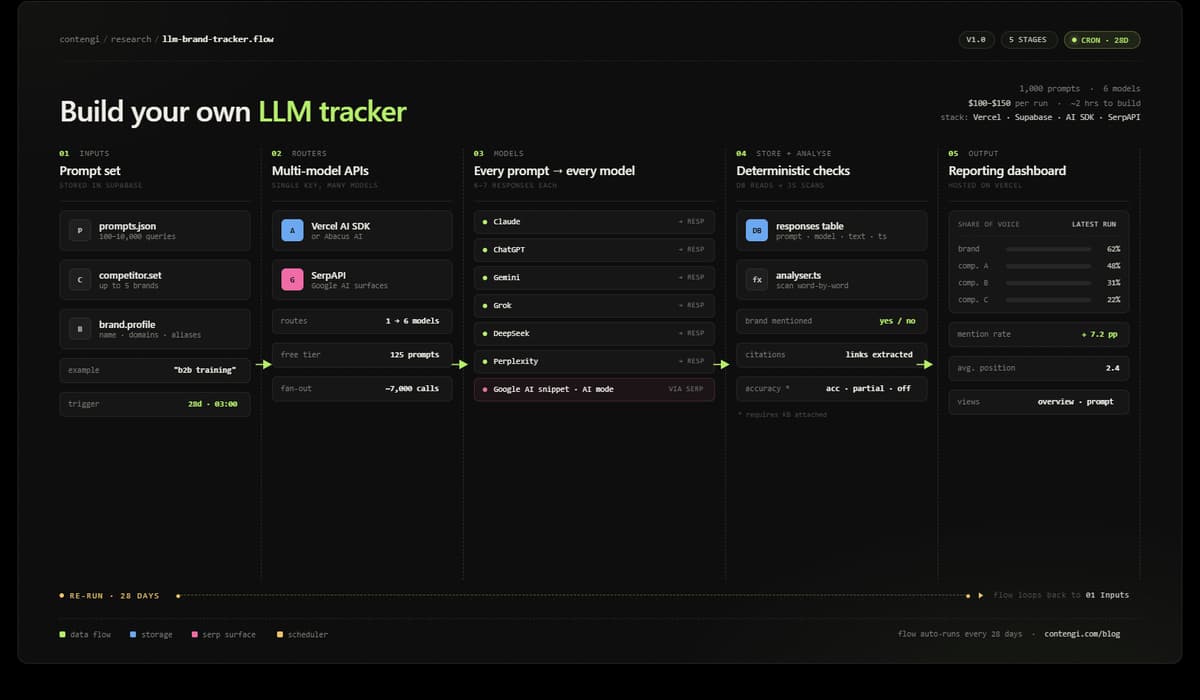
The stack is five components. Nothing exotic.
1. Cursor with Claude Code - or Claude Code native, VS Code, or terminal. This is where you write and run the build. Use plan mode first. Run Sonnet or Opus for this - not Haiku. The complexity of the architecture needs a capable model to reason through it cleanly.
2. Vercel - free tier. This is where the app is hosted and where the cron job runs. Vercel's scheduler handles the automated prompt runs on your chosen cadence. Set it to every 28 days.
3. Supabase - free tier. This is your database. Every prompt response from every model gets saved here. The deterministic analysis reads from this database. Everything lives here.
4. Multi-model API - Vercel AI SDK or Abacus AI. This is what lets you ping every model through a single API key rather than managing separate keys for Claude, Gemini, Grok, DeepSeek, and ChatGPT individually.
5. SerpAPI - free for 125 prompts (250 free api calls per month). This handles the Google side: AI snippets and Google AI mode (2 calls each). These are not technically LLMs and need to be routed separately from the LLM calls.
The prompt you give Claude to build this:
Build an LLM tracker using a set of predefined prompts and competitors (up to 5,000) using a multi-model LLM API and SerpAPI that systematically runs every prompt to every model, captures every response, saves it to a database, and then uses deterministic code to check whether the brand was mentioned. Present a report in a dashboard showing brand mention rate, citation rate, share of voice relative to the competitor set, and average position. Include a general overview page that reports on totals across all runs, plus a report at the individual prompt level showing the latest run. On the prompt-level report, list all cited links. Add a scheduler to run on a cron job every 28 days. Host on Vercel. Database in Supabase.
If you have a knowledge base set up, you can take this further. Instruct the build to add an accuracy rating to every mention - Accurate or Off, with a middle state of Partly Accurate for responses that land somewhere between the two. This gives you a qualitative layer on top of the presence data. This tells you whether what the model said was correct.
The full build took me around two hours, plus a few more hours of testing. It runs automatically.
Any team with a technical member should build this themselves.
Have fun. Let me know if you need help.